SED Panel
Scene Edit Detection for After Effects

● SED Panel v3.2

SCENE
DETECTION
PANEL

Stop scrubbing. SED Panel finds every cut in your AE timeline automatically — every scene as a clickable thumbnail.

Get SED Panel ↓
00:00:15:00 — ABOUT

Auto-detect scenes. Right inside AE.

SED (Scene Edit Detection) Panel is an Adobe After Effects extension that automatically detects scene cuts directly inside your AE timeline. No more scrubbing through footage manually — every scene appears as a clickable thumbnail grid.

From v1.0 to v3.2, the panel has evolved with features like multi-layer marker reading, per-layer thumbnails, merge scene for already-split layers, and full compatibility from AE 2022 to AE 2026.
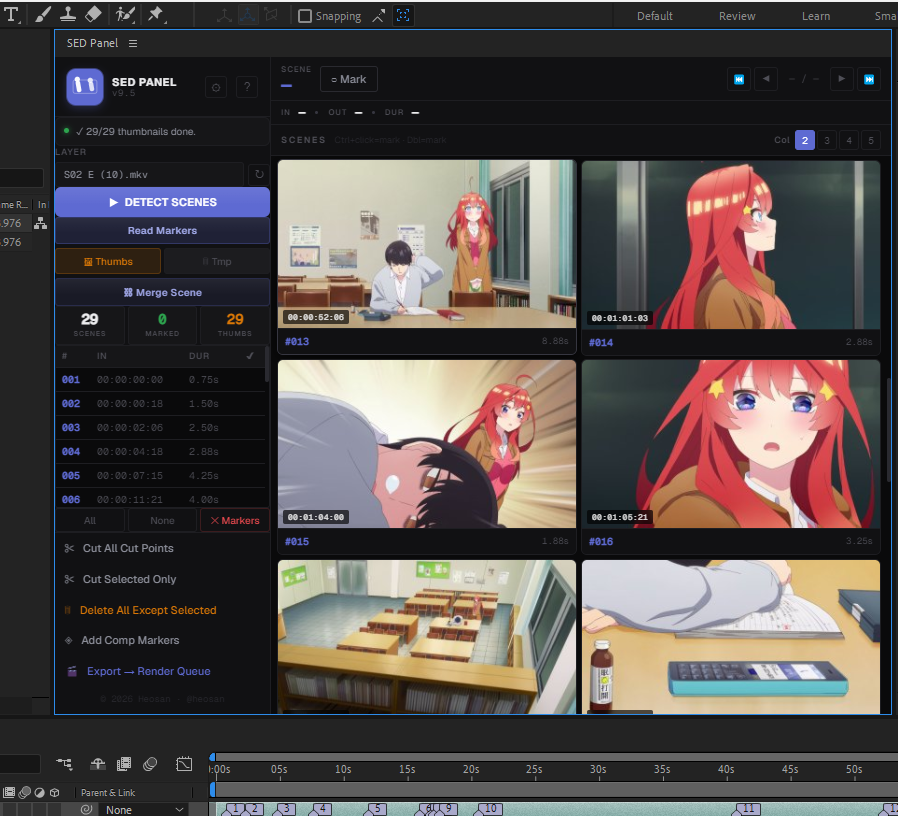
SED Panel v3.2 inside Adobe After Effects
SED Panel v3.2 — Scene Grid
00:02:00:00 — FEATURES

Everything you need to
edit faster.

Detection

Auto Scene Detection

Detects every cut point in your footage with one click. Works on any layer type.

Thumbnails

Per-Layer Thumbnails

Reads markers from ALL layers and generates thumbnails for each detected scene.

Markers

Multi-Layer Markers

Supports reading and writing markers across multiple layers simultaneously.

Merge

Merge Scene

Physically merges already-split layers back together — no need to undo and redo.

UI

Bilingual Interface

Full English & Indonesian language support built directly into the panel.

Compatibility

AE 2022 → AE 2026

Compatible across a wide range of After Effects versions, from 2022 all the way to AE 2026.

00:02:45:00 — HOW IT WORKS

Three clicks to
cut your timeline.

00:03:30:00 — GET IT

Ready to speed up
your workflow?

Download SED Panel from GitHub or support development on Patreon to get access to the latest version and updates.

NOW PLAYING